Configuration Extensions
Configuration Extensions in Diginsight Components provide enhanced configuration management capabilities that extend the standard .NET Core configuration system. These extensions offer advanced configuration loading, Azure Key Vault integration, and intelligent file resolution to support both development and production scenarios.
📖 Table of Contents
1. 📋 Overview
The Configuration Extensions enhance the standard .NET Core configuration system by providing:
- Extended File Hierarchy with ‘.local’ configuration files: support for
.localconfiguration files to override settings on the developer machine - Support for debugging ‘.environment’ configurations: all
.environment.jsonconfigurations can be debugged from the developer machine - External Configuration Folders: support for configuration files stored outside the application directory
- Configuration observability at startup: startup logging of loaded configuration sources and values for troubleshooting support.
- Azure Key Vault Integration: Seamless secrets management with automatic authentication and secretless access from the developer machine.
These extensions are part of the Diginsight.Components.Configuration package and work seamlessly with existing .NET applications.
✨ Key Benefits
- 🎯 Backward Compatible Works as a drop-in extension for standard .NET configuration without breaking existing code.
- 🔒 Built-in Security Automatic Azure Key Vault integration with support for managed identities, client secrets, and development credentials.
- 🔧 Developer configurations for local debugging are versioned Local override files, make development and debugging easier and faster.
- 🚀 Reduced Configuration Redundancy Debug settings are not repeated in all environment files. No need to manually enable/disable debug configurations on the developer machine.
- ☁️ Support for debugging all environments from the developer machine All environments configurations can be debugged from the developer machine.
- ☁️ Support for debugging with private configurations versioned on external repositories Developing on public repositories, debugging can happen with private configurations, versioned on external repositories.
2. 🛠️ Getting Started
Configuration extensions can be used just loading application configuration by means of ConfigureAppConfiguration2 extension method.
Installation Install the Configuration Extensions package:
dotnet add package Diginsight.Components.ConfigurationBasic Setup Replace your standard configuration setup with the enhanced version:
Before: Standard .NET Configuration
var builder = WebApplication.CreateBuilder(args);
// Standard configuration only
After: Enhanced Configuration
var builder = WebApplication.CreateBuilder(args);
builder.Host.ConfigureAppConfiguration2(loggerFactory);
Generic Host Applications
var host = Host.CreateDefaultBuilder(args)
    .ConfigureAppConfiguration2(loggerFactory)
    .ConfigureServices(services =>
    {
        // Your service configuration
    })
    .Build();
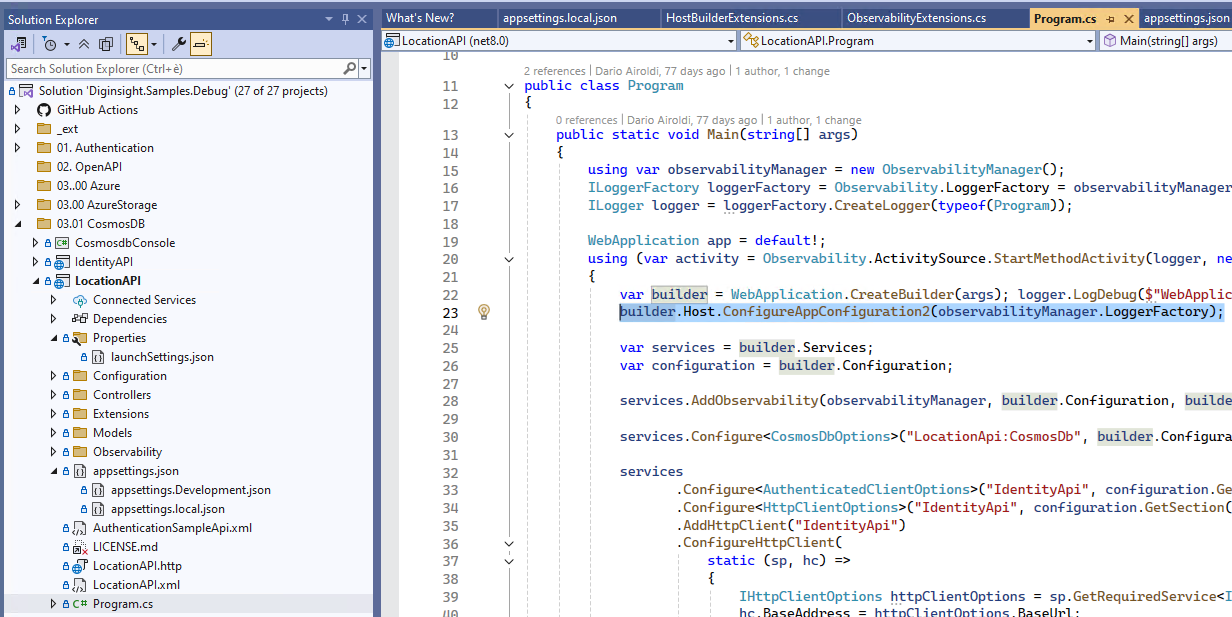
The image below shows diginsight sample LocationAPI that is loading configurations by means of builder.Host.ConfigureAppConfiguration2(); extension method.
3. 🏗️ Enhanced Configuration Hierarchy
Standard .NET Core provides this configuration hierarchy:
📁 Standard .NET Configuration
├── appsettings.json (lowest priority)
├── appsettings.{Environment}.json
├── User Secrets (Development only)
└── Environment Variables (highest priority)
Diginsight Configuration Extensions enhance this with additional layers:
📁 Enhanced Configuration Hierarchy
├── appsettings.json (lowest priority)
├── appsettings.{Environment}.json
├── external appsettings.{Environment}.json
├── 🆕 appsettings.local.json (Development only)
├── 🆕 appsettings.{Environment}.local.json (Development only)
├── 🆕 Azure Key Vault secrets (if configured)
├── User Secrets (Development only)
└── Environment Variables (highest priority)
Local Development Files
The .local.json files provide a clean way to override configuration during debugging on the developer machine:
- Purpose: Local development overrides without affecting environment configuration files
- Environment: Only loaded in local developer machine
- Security: Can be versioned so that debug settings can be shared among team members
- Usage: Connection strings, API endpoints, and environment-specific values are taken from environment file or environment Azure Key Vault.
Example: appsettings.local.json
{
  "Logging": {
    "LogLevel": {
      "Default": "Trace",
      "Microsoft": "Warning",
      "Microsoft.Hosting.Lifetime": "Information",
      "Diginsight.SmartCache.Externalization.ServiceBus": "Warning",
      "*.BodyLoggingHandler": "Warning"
    }
  }
}
Environment files selection with AppsettingsEnvironmentName
Configuration Extensions extends standard .NET Core environment system, with backward compatibility:
DOTNET_ENVIRONMENTfor client or console applicationsASPNETCORE_ENVIRONMENTfor Web APIs or Web applications
Standard Environment Behavior By default, the configuration system uses the environment name from these variables to select the appropriate configuration files:
# Standard environment setup
DOTNET_ENVIRONMENT=Development
# Loads: appsettings.json + appsettings.Development.json

ASPNETCORE_ENVIRONMENT=Production
# Loads: appsettings.json + appsettings.Production.json
Important: The developer machine normally runs with
Developmentconfiguration. Switching XXX_ENVIRONMENT to values different fromDevelopmentmay require authentication changes or other adjustments that may not work on the developer machine. As a result, onlyappsettings.development.jsoncan normally be debgged on the developer machine.
Environment Selection with AppsettingsEnvironmentName
Configuration Extensions allow keeping XXX_ENVIRONMENT variables set to Development (eg. to ensure resources access with developer grants) and use AppsettingsEnvironmentName to override the environment name only for configuration file selection.
in the followint example, the application runs with "ASPNETCORE_ENVIRONMENT": "Development" but loading appsettings.Testms.json appsettings environment files.
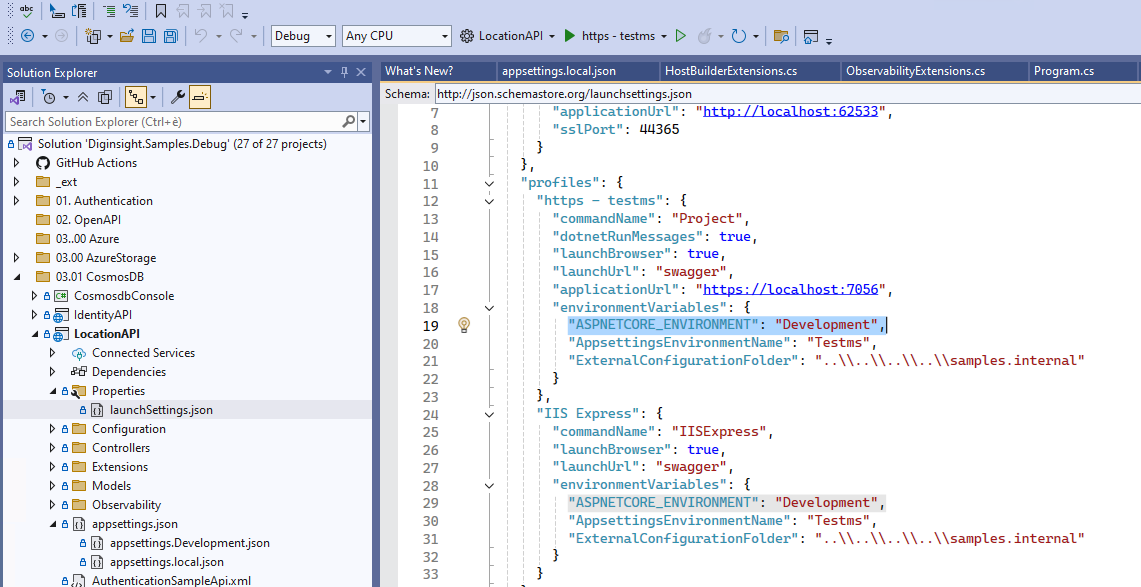
Important: This allows debugging all environments configurations from the developer machine.
# Keep standard behavior as Production
DOTNET_ENVIRONMENT=Production
ASPNETCORE_ENVIRONMENT=Production
# Override configuration file selection
AppsettingsEnvironmentName=Staging

# Result:
# - Application runs with Production environment behavior
# - Configuration loads: appsettings.json + appsettings.Staging.json
Common Use Cases
1. Staging Environment with Production Security
# Environment Variables
ASPNETCORE_ENVIRONMENT=Production     # Full authentication enabled
AppsettingsEnvironmentName=Stage    # Load staging configuration

# Configuration Files Loaded:
# ├── appsettings.json
# ├── appsettings.Stage.json        # ← Uses AppsettingsEnvironmentName
# └── Environment Variables
2. UAT Environment with Production Features
# Environment Variables
DOTNET_ENVIRONMENT=Production         # Production feature flags
AppsettingsEnvironmentName=UAT        # Load UAT-specific config

# Configuration Files Loaded:
# ├── appsettings.json
# ├── appsettings.UAT.json            # ← Uses AppsettingsEnvironmentName
# └── Environment Variables
3. Multiple Production Deployments
# Blue Deployment
ASPNETCORE_ENVIRONMENT=Production
AppsettingsEnvironmentName=Production-Blue

# Green Deployment
ASPNETCORE_ENVIRONMENT=Production
AppsettingsEnvironmentName=Production-Green

# Each loads different configuration while maintaining Production behavior
Priority and Override Logic
The environment file selection follows this priority:
AppsettingsEnvironmentName(if set) - Highest PriorityASPNETCORE_ENVIRONMENT(for web applications)DOTNET_ENVIRONMENT(for all applications)- Default fallback (no environment-specific files)
// Pseudo-code for environment resolution
string environmentName =
    Environment.GetEnvironmentVariable("AppsettingsEnvironmentName") ??
    Environment.GetEnvironmentVariable("ASPNETCORE_ENVIRONMENT") ??
    Environment.GetEnvironmentVariable("DOTNET_ENVIRONMENT") ??
    "Production";

// Load configuration files
// appsettings.json
// appsettings.{environmentName}.json
// appsettings.{environmentName}.local.json (Development only)
Best Practices
✅ Recommended Usage
# Production with environment-specific configuration
ASPNETCORE_ENVIRONMENT=Production
AppsettingsEnvironmentName=Staging
✅ Development Override
# Development with custom configuration set
DOTNET_ENVIRONMENT=Development
AppsettingsEnvironmentName=Integration
⚠️ Be Careful With
# Avoid confusing combinations
ASPNETCORE_ENVIRONMENT=Development
AppsettingsEnvironmentName=Production  # This might load prod config in dev mode
🔒 Security Considerations
- Ensure
AppsettingsEnvironmentNameconfiguration files don’t contain secrets incompatible with the runtime environment - Use Azure Key Vault for environment-specific secrets
- Validate that the combination of environment behavior and configuration is secure
4. 🔐 Azure Key Vault Integration
Configuration Extensions provide seamless Azure Key Vault integration through a standard configuration section:
Basic Azure Key Vault Configuration
{
  "AzureKeyVault": {
    "Uri": "https://your-keyvault.vault.azure.net/",
    "TenantId": "your-tenant-id",
    "ClientId": "your-client-id",
    "ClientSecret": ""  // Leave empty for managed identity
  }
}
Authentication to the Azure Key Vault happens by means of DefaultCredentialProvider class, which supports the authentication methods:
Development Environment
csharp // Automatic authentication chain: // 1. Azure CLI Credential // 2. Visual Studio Code Credential // 3. Visual Studio Credential // 4. Client Secret Credential (if provided)Production Environment
// Production authentication:
// 1. Managed Identity Credential (recommended)
// 2. Client Secret Credential (if provided)
Key Vault Secret Naming
Configuration Extensions automatically convert Key Vault secret names to .NET configuration keys:
| Key Vault Secret Name | Configuration Key |
|---|---|
MyApp--Database--ConnectionString |
MyApp:Database:ConnectionString |
ConnectionStrings--DefaultConnection |
ConnectionStrings:DefaultConnection |
ApiSettings--BaseUrl |
ApiSettings:BaseUrl |
5. 💡 Usage Patterns
Development Workflow
1. Base Configuration (appsettings.json)
{
  "Logging": {
    "LogLevel": {
      "Default": "Information"
    }
  },
  "ConnectionStrings": {
    "DefaultConnection": "Server=prod-server;Database=MyApp;"
  }
}
2. Development Overrides (appsettings.Development.json)
{
  "Logging": {
    "LogLevel": {
      "Default": "Debug",
      "Microsoft": "Warning"
    }
  }
}
3. Local Development (appsettings.local.json)
{
  "ConnectionStrings": {
    "DefaultConnection": "Server=localhost;Database=MyApp_Local;Trusted_Connection=true;"
  },
  "ExternalServices": {
    "ApiKey": "local-development-key"
  }
}
Production Deployment
1. Production Configuration (appsettings.Production.json)
{
  "Logging": {
    "LogLevel": {
      "Default": "Warning"
    }
  },
  "AzureKeyVault": {
    "Uri": "https://prod-keyvault.vault.azure.net/",
    "TenantId": "production-tenant-id"
  }
}
2. Azure Key Vault Secrets
ConnectionStrings--DefaultConnectionExternalServices--ApiKeyApplicationInsights--ConnectionString
3. Environment Variables
DOTNET_ENVIRONMENT=Production
ASPNETCORE_URLS=https://+:443;http://+:80
6. 🔧 Advanced Configuration
External Configuration Folders
External Configuration Folders can be used to Store private configuration files in private repositories, when working on public repositories:
the image below shows the diginsight sample LocationAPI loading configurations from the samples.internal folder:
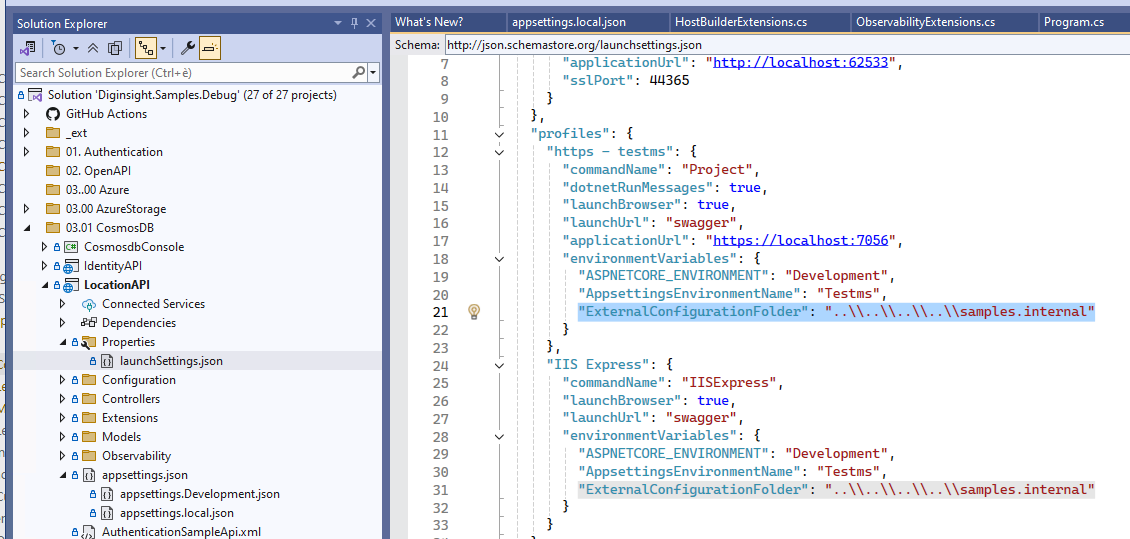
In this way, using the following environment variable:
# Set external configuration folder
"ExternalConfigurationFolder": "..\\..\\..\\..\\samples.internal"
Environment configurations can be loaded from the samples.internal external folder that is versioned on the samples.internal private repository.
the image below shows the diginsight sample LocationAPI into the samples folder, loading private configurations from the samples.internal folder:
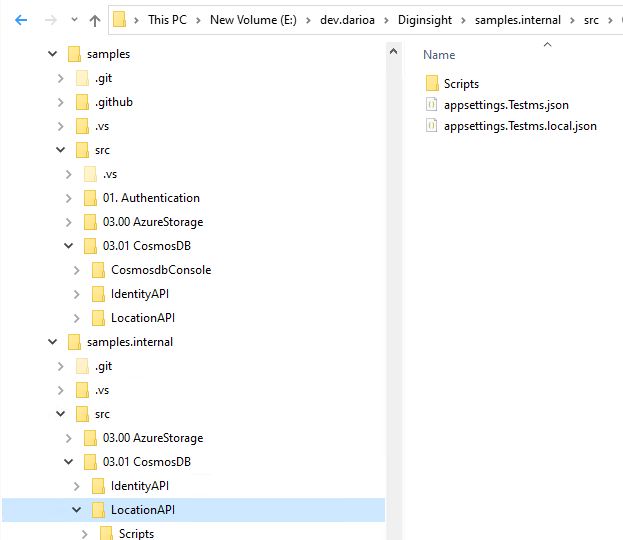
The system performs intelligent hierarchical search for configuration files on the samples.internal folder:
📁 External Configuration Search

/samples.internal
├─ /src/03.01 CosmosDB/LocationAPI
├─ ├── /src/03.01 CosmosDB/            # Most specific
├─ ├── src/                            # Less specific
└─ └── /                               # Least specific    (root)
China Region Support
Automatic support for Azure China regions:
{
  "AzureKeyVault": {
    "Uri": "https://your-keyvault.vault.azure.cn/",
    "TenantId": "your-tenant-cn"
  }
}
The system automatically detects China regions and sets the appropriate authority host.
7. 💻 Best Practices
🔒 Security
- Never commit secrets to source control
- Use managed identities in production
- Add
*.local.jsonto.gitignore - Use external folders for sensitive configuration
- Implement proper access controls on configuration folders
📁 File Organization
📁 Recommended File Structure
├── appsettings.json                          # Base configuration
├── appsettings.local.json                    # Local overrides (gitignored)
├── appsettings.Development.json              # Development settings
├── appsettings.Development.local.json        # Dev local overrides (gitignored)
├── appsettings.Production.json               # Production settings
└── .gitignore                                # Include *.local.json
⚙️ Configuration Design
Use hierarchical keys for organization:
{
  "Database": {
    "ConnectionString": "...",
    "Timeout": 30,
    "RetryPolicy": { "MaxAttempts": 3 }
  }
}
Separate concerns by configuration section:
{
  "Logging": { ... },
  "ConnectionStrings": { ... },
  "ExternalServices": { ... },
  "FeatureFlags": { ... }
}
Use meaningful default values in base configuration
🚀 Development Workflow
- Start with base configuration (
appsettings.json) - Add environment-specific settings (
appsettings.{Environment}.json) - Create local overrides (
appsettings.local.json) for development - Use Key Vault for production secrets
- Test configuration resolution in different environments
8. 🐛 Troubleshooting
Common Issues
Configuration Not Loading
Problem: Configuration values not being loaded as expected.
Solutions:
// 1. Verify setup
builder.Host.ConfigureAppConfiguration2(loggerFactory);

// 2. Check file existence and naming
// - appsettings.json
// - appsettings.Development.json
// - appsettings.local.json (Development only)

// 3. Verify environment variables
Console.WriteLine($"Environment: {Environment.GetEnvironmentVariable("DOTNET_ENVIRONMENT")}");
Key Vault Access Issues
Problem: Cannot access Azure Key Vault secrets.
Solutions:
// 1. Verify authentication
// Development: Ensure Azure CLI login or VS authentication
// Production: Verify managed identity or client secret

// 2. Check Key Vault configuration
{
  "AzureKeyVault": {
    "Uri": "https://correct-keyvault-name.vault.azure.net/",
    "TenantId": "correct-tenant-id"
  }
}

// 3. Verify permissions
// Ensure the identity has "Key Vault Secrets User" role
External Folder Not Found
Problem: External configuration folder not being found.
Solutions:
# 1. Verify environment variable
echo $ExternalConfigurationFolder

# 2. Check folder exists and has correct permissions
ls -la /path/to/external/config

# 3. Verify hierarchical search paths
# The system searches from specific to general paths
Debug Logging
Enable detailed logging to troubleshoot configuration issues:
// In Program.cs
builder.Logging.AddFilter("Diginsight.Components.Configuration", LogLevel.Debug);

// Or in appsettings.json
{
  "Logging": {
    "LogLevel": {
      "Diginsight.Components.Configuration": "Debug"
    }
  }
}
Configuration Observability at Startup
Configuration Extensions provide startup logging of loaded configuration sources and values for troubleshooting support. This observability feature helps developers and operators understand:
- Which configuration files were loaded and in what order
- Which configuration sources are active (files, Key Vault, environment variables)
- Configuration resolution hierarchy and value sources
- Missing or failed configuration sources
Example startup logs:
[Configuration] Loading configuration from: appsettings.json
[Configuration] Loading configuration from: appsettings.Development.json
[Configuration] Loading configuration from: appsettings.local.json
[Configuration] Azure Key Vault integration: Enabled (https://myapp-keyvault.vault.azure.net/)
[Configuration] External configuration folder: /etc/myapp/config
[Configuration] Configuration loaded successfully with 4 sources
This observability is particularly valuable for: - Debugging configuration issues in different environments - Verifying configuration file resolution - Troubleshooting Key Vault connectivity - Understanding configuration precedence
Configuration Inspection
Inspect loaded configuration values:
// Dump all configuration
public void InspectConfiguration(IConfiguration configuration)
{
    foreach (var kvp in configuration.AsEnumerable())
    {
        Console.WriteLine($"{kvp.Key}: {kvp.Value}");
    }
}

// Check specific values
var connectionString = configuration.GetConnectionString("DefaultConnection");
var apiKey = configuration["ExternalServices:ApiKey"];
9. 📊 Summary
Configuration Extensions provide a powerful enhancement to .NET’s configuration system, offering:
- Extended File Hierarchy with ‘.local’ configuration files for local development overrides
- Support for debugging ‘.environment’ configurations from the developer machine
- External Configuration Folders for enhanced security and separation of concerns
- Configuration observability at startup with detailed logging of loaded sources
- Seamless Azure Key Vault integration with automatic authentication
- Backward compatibility with existing .NET applications
By adopting Configuration Extensions, you get a more flexible, secure, and developer-friendly configuration system that scales from development to production environments.
Next Steps:
- Install
Diginsight.Components.Configuration - Replace your configuration setup with
ConfigureAppConfiguration2 - Add
.local.jsonfiles to.gitignore - Configure Azure Key Vault for production secrets
- Explore advanced features like external folders and tag filtering